

Desktop app
A dedicated app for your desk, with native notifications when an agent needs you.
Web app and desktop app
Give every project its own agents, each in its own chat. They run your automations on schedule, browse the web, and ask before anything that matters. You step in with one tap.
See it working
This is the ShiftHands app: projects down the side, a chat per agent, automations that report back, and a browser you can take over.
Recorded in the ShiftHands demo workspace.
Projects and agents
Group agents into projects the way you already think about your work. Every agent keeps its own chat, history and model, so research never gets tangled up with your inbox.

Live status
Each agent’s mascot shows what it’s doing right now. No dashboards to decode.
Typing away on your task. The chat shows each step as it happens.

Waiting on an approval or a quick hand in the browser.

Resting until the next message or scheduled automation.
Automations
Tell an agent to do something every morning or every hour. See what’s coming up, what’s running, and what finished, with a tidy result card in the agent’s chat.

Examples from the ShiftHands demo workspace.
Approvals
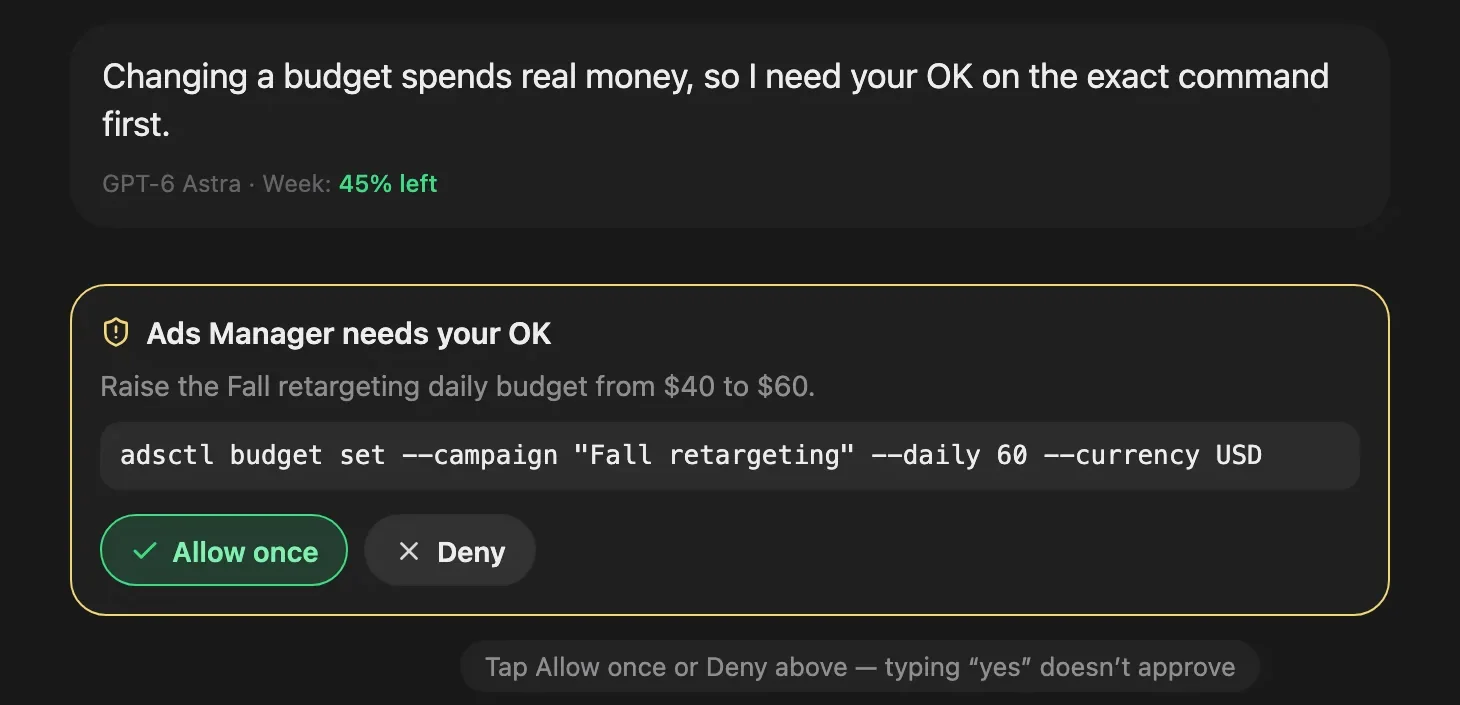
Before an agent runs a command, sends something or changes your files, it stops and shows you exactly what it wants to do. Allow it once or deny it, from your desk or your phone.
Browser and computer use
Agents work in their own browser space on your Mac. Watch it live from ShiftHands, step in when a site wants a human, then hand control straight back.

Ego Lite is a free agent browser for your Mac from Citro Labs. Download it from their site and your ShiftHands agents can browse, click and fill in forms while you watch. Ego Lite is a separate product with its own terms. macOS only for now.
Bring your own subscriptions
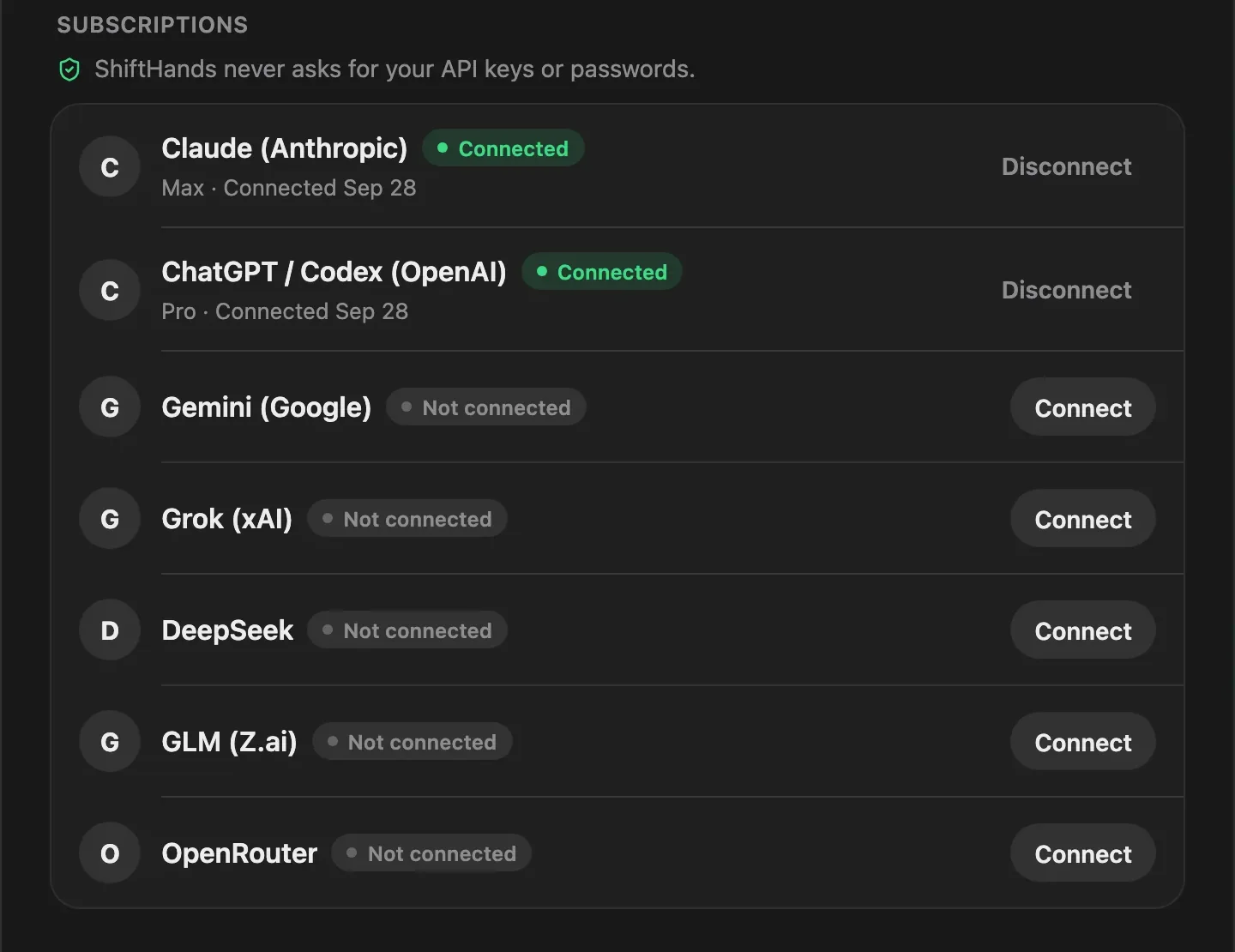
ShiftHands doesn’t resell model access. Connect your own accounts and your agents run on them. Put your writer on one model and your researcher on another.
Desktop and web
A dedicated app for your desk, with native notifications when an agent needs you.
Open ShiftHands in any browser. On your phone it’s the same workspace, sized for your thumb.
Fixes and new features reach every workspace automatically. Your agents, chats and settings stay yours.
Pricing
$0forever
One project and a crew of three, with a daily allowance.
Start freeMost popular
$41.58/mo
Billed yearly ($499/yr) — 2 months free. Or $49.99 billed monthly.
$49.99/month
Billed monthly. Or $499/yr billed yearly — 2 months free.
Cancel anytime in two clicks. Checkout opens soon: start on Free and reserve Pro in the app.
Your AI subscription is the brain. ShiftHands is the crew that uses it: agents in every project, running on schedule, browsing the web, asking before anything risky. You keep paying your AI provider for thinking; we never mark up your tokens.
Pro is $49.99/month, or $499/year billed annually. Model usage runs on, and is billed by, your own AI subscriptions.
FAQ
A ShiftHands account and at least one AI subscription to connect, such as Claude, ChatGPT or Gemini. Create your first project, add an agent, and give it a task in its chat.
Claude, ChatGPT / Codex, Gemini, Grok, DeepSeek, GLM and OpenRouter. Each agent can use a different one, and you can switch an agent’s model from its chat.
Free includes 25 agent messages a day, one project, three agents, two daily automations and subagent teams of up to two, plus the live browser, approvals and the web and Mac apps. Pro is $49.99/month, or $499/year billed annually, and removes every limit: unlimited messages, projects, agents and automations on any schedule, teams of any size, and priority support.
Your AI subscription is the brain. ShiftHands is the crew that uses it: agents in every project, running on schedule, browsing the web, asking before anything risky. You keep paying your AI provider for thinking; we never mark up your tokens.
Actions that need your OK, like running a command, stop and wait for you. You see exactly what the agent wants to do and tap Allow once or Deny. Typing “yes” in the chat doesn’t count.
Not for chat, projects, automations or approvals. For browser and computer use, download Ego Lite, a free agent browser from Citro Labs. It’s a separate download with its own terms, not part of ShiftHands, and it’s macOS only for now.
Yes. ShiftHands is a web app, so it works in your phone’s browser: check on agents, read results and tap approvals on the go. At your desk, use the desktop app or any browser.
Improvements roll out to every workspace automatically. When a new version is ready, the app lets you know and picks it up. Your projects, agents and chats stay private to your workspace.